SKU: IOWC-2000
📋 GST Invoice Available

XBee USB Adapter (CP2102) for ZigBee Modules

₹471.00 (Inclusive of all taxes)
Out of Stock

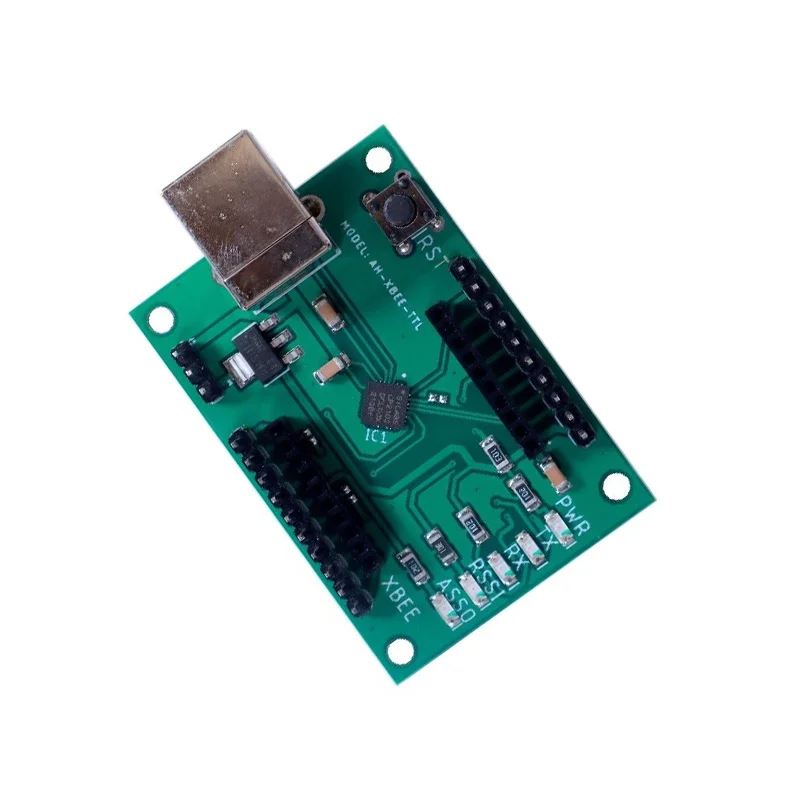
The XBee USB Adapter with CP2102 USB-to-serial chip provides a direct interface for programming and communicating with Digi International XBee Series 1, 2.5, and Pro ZigBee/802.15.4 modules via a standard USB Type-B cable, featuring onboard voltage regulation and level shifting.

Features

  • Universal compatibility with all XBee ZigBee modules (Series 1, 2.5, Standard, Pro).
  • Integrated CP2102 USB-to-serial converter for direct PC connectivity.
  • Onboard 3.3V regulator and 3.3V/5V level converter for interfacing with 5V logic devices.
  • Status LEDs for Power, RSSI, RX, and TX for real-time monitoring.
  • All XBee pins broken out to a standard 2.54mm pitch header strip.

Out of stock

Description

This XBee USB Adapter serves as an essential development and configuration tool for engineers working with Digi International’s XBee family of 2.4GHz ZigBee and 802.15.4 wireless modules. The board integrates a Silicon Labs CP2102 USB-to-UART bridge, providing a stable serial connection to a host computer for sending AT commands, configuring module parameters, and transferring data. It simplifies the firmware update process and network debugging.

Power is supplied directly from the USB bus, which is regulated down to the 3.3V required by the XBee module. The inclusion of a bi-directional logic level converter allows safe communication between the 3.3V XBee and external 5V microcontroller systems like Arduino Uno. The compact board design includes a reset button for cycling module power and clear status LEDs for monitoring network signal strength (RSSI) and serial data flow.

Key Features

  • Direct USB serial interface for configuring XBee modules via terminal software.
  • Enables rapid prototyping and firmware updates for ZigBee mesh networks.
  • Onboard voltage regulation powers the XBee module directly from USB.
  • Logic level conversion protects 3.3V XBee pins when connected to 5V systems.
  • Comprehensive status LEDs provide visual feedback on power, link quality, and data transmission.
  • All 20 pins of the XBee socket are accessible via standard headers for custom wiring.
  • Reset button allows for quick module reboot without disconnecting USB.
  • Compact and robust form factor ideal for benchtop testing and integration.

Applications

  • Prototyping and configuring ZigBee wireless sensor networks.
  • Development platform for IoT mesh networking applications.
  • Educational tool for learning wireless communication protocols.
  • Gateway interface for PC-based data logging from XBee networks.
  • Testing and debugging tool for industrial wireless control systems.

Technical Specifications

Interface ControllerCP2102 USB-to-Serial Bridge
Compatible ModulesDigi International XBee Series 1, Series 2.5, Standard, Pro (ZigBee/802.15.4)
USB ConnectorType-B
Voltage Regulation3.3V Output
Logic Level Conversion3.3V / 5V Bi-directional
Status IndicatorsPower, RSSI, RX, TX LEDs
Pin Headers2.54mm Pitch, All XBee Pins Broken Out
Board Dimensions52mm x 36mm x 14mm
Weight12g

Frequently Asked Questions

How do I connect and communicate with my XBee module using this adapter?

Insert your XBee module into the socket, ensuring pin 1 is aligned. Connect a USB Type-B cable from the adapter to your computer. Your OS should install the CP2102 driver automatically. Open a serial terminal application (e.g., PuTTY, Arduino Serial Monitor) and select the corresponding COM port. Set the baud rate to match your XBee's configuration (default is often 9600 or 115200). You can then send AT commands directly to configure the module.

Can I use this adapter to update the firmware on my XBee Series 2.5 module?

Yes, this adapter provides the necessary serial and control lines for firmware updates. You will need to use Digi International's official X-CTU software. Within X-CTU, select the correct COM port assigned to the CP2102 interface. The software will guide you through reading the current firmware and flashing a new version. Ensure the module is securely seated and the adapter is connected to a stable USB port during the update process to prevent corruption.

What is the purpose of the onboard 3.3V/5V level converter?

The level converter protects the 3.3V logic pins of the XBee module when you connect them to external 5V microcontroller systems, such as an Arduino Uno. It safely translates 5V signals from the external device down to 3.3V for the XBee to read, and translates 3.3V signals from the XBee up to 5V for the external device to read. This prevents damage to the XBee's sensitive I/O pins and ensures reliable communication between devices with different logic voltage levels.

Package Includes

  • 1 x XBee USB Adapter (CP2102)

Additional Information

Weight 0.012 kg
Dimensions 3.6 × 5.2 × 1.4 cm