SKU: IOWC-0714
📋 GST Invoice Available

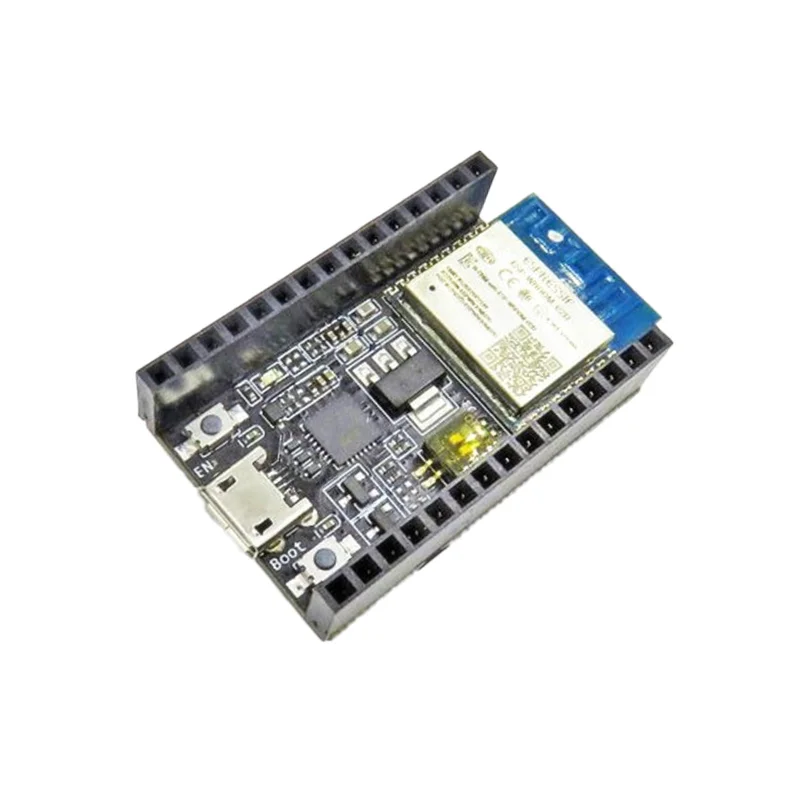
Espressif ESP8266-DevKitC Development Board w/ ESP-WROOM-02D

₹559.00 (Inclusive of all taxes)
Out of Stock

The official Espressif ESP8266-DevKitC is a development board built around the ESP-WROOM-02D module, providing a complete platform for Wi-Fi-enabled IoT applications. It features an integrated USB-UART bridge for easy programming via the Arduino IDE or ESP-IDF and includes dual-row headers for rapid prototyping.

Features

  • Official Espressif development board featuring the integrated ESP-WROOM-02D Wi-Fi module for reliable 2.4GHz 802.11 b/g/n connectivity.
  • Onboard USB-to-UART bridge (CP2102) simplifies firmware flashing and serial communication without external programmers.
  • Dual-row GPIO headers provide easy access to all I/O pins for connecting sensors, actuators, and peripherals.
  • Includes user-programmable LED and reset button for basic debugging and control during development.
  • Fully supported by open-source frameworks including Arduino Core for ESP8266, ESP-IDF, and MicroPython.

Out of stock

Description

The ESP8266-DevKitC is Espressif’s official development platform for the ESP-WROOM-02D, a highly integrated Wi-Fi SoC. It breaks out all module pins to standard 2.54mm headers, enabling straightforward integration into breadboards and custom PCBs. The board includes a CP2102 USB-to-serial converter, providing both power and a communication channel for programming and debugging.

Designed for rapid IoT prototyping, the board leverages the ESP8266’s 32-bit Tensilica processor, ample GPIO, and hardware interfaces like I2C, SPI, and PWM. Its low-power sleep modes make it suitable for battery-powered sensor nodes, while the robust Wi-Fi stack supports both station and access point modes for flexible network topologies.

Key Features

  • Official development board for the ESP-WROOM-02D module, ensuring hardware compatibility and reliability.
  • Integrated CP2102 USB-UART bridge provides plug-and-play serial communication and power over USB.
  • All available GPIO, ADC, and control pins are broken out to two rows of male headers for easy prototyping.
  • Onboard LED and tactile button allow for basic user interaction and firmware testing without external components.
  • Comprehensive software support via the Arduino IDE with the ESP8266 Core, ESP-IDF, and NodeMCU Lua firmware.
  • Compact form factor designed for breadboard-friendly development and integration into final project enclosures.

Applications

  • Smart home automation nodes for lighting, climate control, and security sensors.
  • Wi-Fi-connected data loggers and environmental monitors (temperature, humidity, air quality).
  • Prototyping IoT gadgets and wearables with cloud connectivity (AWS IoT, Blynk, Adafruit IO).
  • Wireless sensor networks and mesh nodes using ESP-NOW protocol.
  • Retrofit controllers for adding Wi-Fi control to appliances and industrial equipment.

Technical Specifications

Microcontroller/SoCESP8266 (ESP-WROOM-02D module)
Wireless ProtocolsWi-Fi 802.11 b/g/n
Frequency Range2.4 GHz
Supply Voltage5V via USB, 3.3V regulated onboard
InterfacesGPIO, I2C, SPI, UART, PWM, ADC
USB BridgeCP2102 USB-to-UART
AntennaIntegrated PCB antenna (ESP-WROOM-02D)
DimensionsApprox. 10cm x 5cm

Frequently Asked Questions

How do I program the ESP8266-DevKitC using the Arduino IDE?

First, install the ESP8266 board package via the Arduino IDE's Boards Manager. Connect the board via USB, select 'NodeMCU 1.0 (ESP-12E Module)' as the board type, and choose the correct COM port. The onboard CP2102 bridge will be recognized as a serial device. You can then upload sketches directly using the standard upload button, utilizing the board's built-in bootloader and auto-reset circuit.

What is the power supply requirement for this development board?

The board is designed to be powered directly from a standard USB port (5V) via the micro-USB connector. An onboard 3.3V regulator supplies the ESP-WROOM-02D module and I/O pins. For standalone operation, you can supply 5V to the VIN pin or regulated 3.3V to the 3V3 pin, ensuring not to exceed the maximum input voltage on the GPIO pins, which is 3.6V.

Can I use the GPIO pins for 5V logic sensors or outputs?

No, the ESP8266's GPIO pins are not 5V tolerant. They operate at 3.3V logic levels. Connecting a 5V signal directly can damage the chip. For interfacing with 5V components, you must use a logic level converter or a voltage divider circuit to step down the signal. The board's I/O pins are broken out directly from the module and share its electrical characteristics.

How do I put the ESP8266 on the DevKitC into deep sleep mode?

Use the `ESP.deepSleep(microseconds)` function in your Arduino sketch. You must connect the GPIO16 (D0) pin to the reset (RST) pin on the board to allow the chip to wake itself up. After entering deep sleep, the current consumption drops to approximately 20µA. The board will wake up via the internal RTC timer, executing a full reset and running the setup() function again.

Package Includes

  • 1 x Espressif ESP8266-DevKitC Development Board

Additional Information

Weight 0.025 kg
Dimensions 10 × 5 × 2 cm